
A patient AI companion that helps your grandma navigate her computer, get things done, and stay connected.
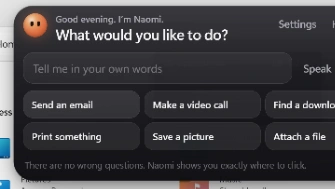
Naomi helps people who find computers confusing, especially parents and grandparents. Just say what you want to do, like “send an email to my granddaughter,” and Naomi figures out what is needed, asks simple questions when something is missing, and points a friendly glowing dot at the exact spot on your screen, one step at a time. It adapts to what you click, celebrates when you finish, and warns you about scams. You stay in control. Naomi simply shows you where.
## The problem
Millions of people, our parents, grandparents, and anyone who didn't grow up with computers, know exactly what they want to do, like "send an email to my granddaughter" or "join a video call." What they don't know is how. Which app, which button, what an address bar even is. Tutorials assume vocabulary they don't have, videos move too fast, and family isn't always around to help. So they give up, or feel embarrassed to ask again.
## What Naomi does
Naomi feels like a patient person sitting beside you, pointing at the screen.
You say your goal in your own words, typed or spoken. Naomi figures out what the whole task actually needs (emailing your granddaughter needs her email address, so Naomi simply asks for it, and helps you find it if you don't know). A friendly orange dot then glides to the exact spot on your real screen and says something like "Click here to write a new email."
Naomi watches what you do next. Click the right thing? "Good!" Click something else? "That's okay, let's try this one." She adapts to wherever you actually are instead of following a rigid script, all the way until the task is truly done, with a little celebration at the end.
It never takes control of your computer. You make every click. Naomi only shows you where.
## Why it matters
This isn't a tutorial video or a simulation. It's a transparent overlay that points at the actual button in whatever app is open on your real screen. It understands the goal behind the click, not just the next step, and it remembers small facts for next time (like an email address) while never storing passwords or card numbers. It also gently warns about common scams, like fake virus popups or strangers asking for remote access, since the people who need this most are often targeted the most.
## How it works
Naomi is an Electron desktop app with a small glass "island" at the top of the screen and a full screen click through overlay that draws the pointer and speech bubble above every app. It uses AI vision models to see a screenshot of your screen and decide the single next helpful action, while a background watcher senses clicks, keystrokes, and screen changes to know when to look again and guide the next step.
Loading comments...
Loading...